WE ARE STILL ADDING NEW INFORMATION TO THE PAGE DAILY. IF YOUR QUESTION HAS NOT BEEN ANSWERED HERE, PLEASE EMAIL ME AT VinceJEdgewater@gmail.com
🏊♂️ Edgewater Pool Cards Update – Meet the Microdot!
We’re excited to roll out our new Microdot & Bluetooth access system—a big upgrade that brings better reliability, stronger security, and modern features to our community access. NEW BLUETOOTH INFORMATION BELOW! Thanks in advance for your patience as we smooth out a few small kinks over the next few days.
🔐 What is the Microdot?
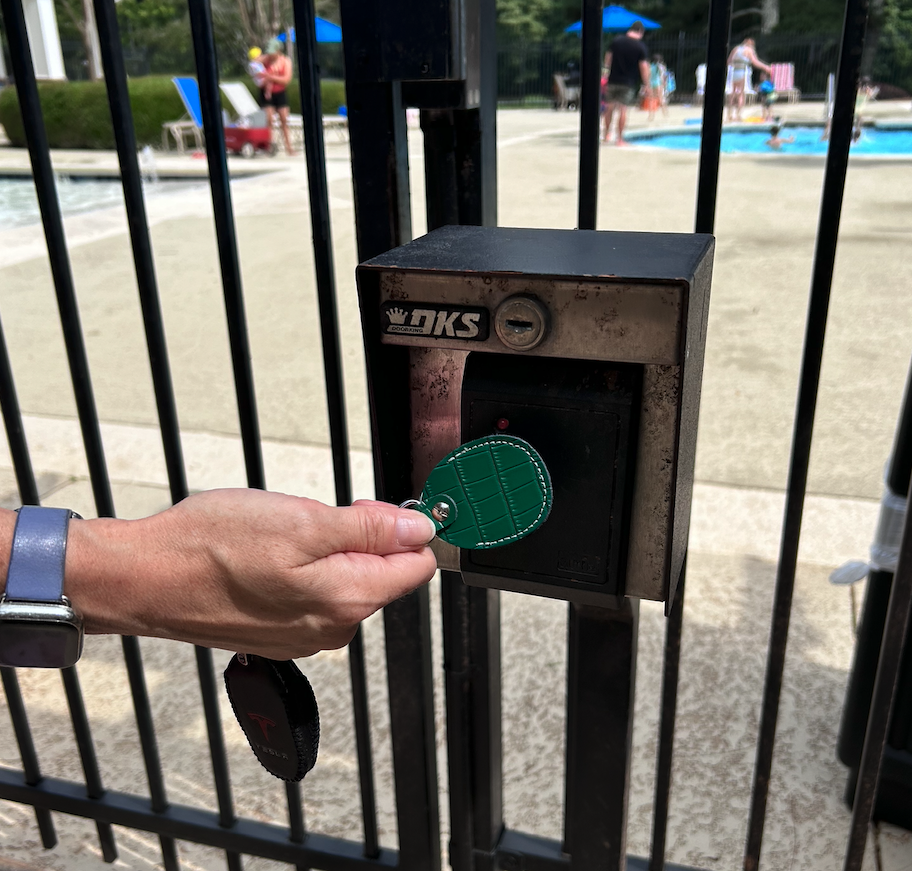
The Microdot is a tiny, high-security tag (with 256-bit encryption!) that gives you access to every card reader across the Edgewater amenity area—including:
- All pool gates (front & back)
- All Clubhouse exterior doors
- Tennis restrooms
- The Outback game/gazebo closet
Just tap your Microdot to the reader, and you’re in!
You can stick it on the back of your phone (under the case), attach it to a key ring, or mount it to an old gift card for your lanyard.
⚠️ Please don’t attach it to your old access card—the deactivated chip can interfere with your Microdot.
🔧 Top 3 Benefits of the New System
✅ More Reliable: Fewer glitches, quicker reads
✅ Scalable & Modern: Ready for future features
✅ Smaller & Smarter: Sleek design, high encryption security
🛒 Handy Accessories on Amazon
Want to keep your Microdot secure, stylish, and easy to carry? Check out these recommended options:
🔑 Everyday Essentials
- Leather Case – Sleek and durable
- 5-Pack Key Holders – Great for the whole household
- Multi-Color Holders – Easily tell whose is whose
💫 Want to Jazz It Up?
Make your Microdot stand out at the pool or tennis courts with these fun and stylish add-ons:
- 💖 Pastel Silicone Card Holder Lanyard Set – Super soft and colorful
- 🧒 Cute & Kid-Friendly Option – Adorable and practical for younger users
- ✨ Waterproof Microdot (airtag) ring – Great for the pool with waterproof function
Perfect for kids, teens, or anyone who wants to add a bit of flair to their access card setup!
📣 Bluetooth Access is Finally Here!
We’re excited to announce that the Bluetooth reader has been installed, tested, and is fully operational! 🎉
Some of you may have already started receiving emails from Elements (noreply@elementssecure.com) to activate your Bluetooth credentials.
📱 Where Does Bluetooth Work?
The Bluetooth feature currently works ONLY at the Front Pool Gate—our busiest entry point!
Got your hands full? Juggling bags and wrangling excited kids? No problem! You can now use either your Microdot or the Bluetooth app (called BlueDiamond™ Mobile on your phone) to open the gate quickly and easily.
🔧 How to Set Up Bluetooth Access
Here’s a quick step-by-step guide to help you activate your Bluetooth credential:
- Check your email for a message from >
noreply@elementssecure.com< with the subject:
“Activate Your Mobile Credential” - Click the first link in the email to download the BlueDiamond™ Mobile app
- Make sure you select the link for your phone type: Apple or Android.
- Click the second link in the email:
“Click Here to Activate”- If the activation link doesn’t work, you may need to copy and paste the Authorization Code into the app manually.
- Follow the on-screen instructions to complete your setup.
💡 Tip: If you’ve previously used the app, you may need to delete and reinstall it for a clean activation.
✅ Quick Reminders:
- Bluetooth access is only available at the Front Pool Gate.
- Your Microdot still works at all other community entry access points.
- You can have up to 3 Bluetooth credentials per household for individuals age 16 and older. (you can purchase more if necessary)
If you need help setting up the app, feel free to reach out—we’re happy to walk you through it!
Thank you for growing with us as we bring more modern features to Edgewater! 🌊
🚨 Be sure to check your junk/spam folders too!
👨👩👧👦 Example: How Many Bluetooth Credentials Work for a Family
Let’s say your household has:
- 2 parents
- 1 teens over 16
- 1 child under 16 ( no access to Bluetooth)
Here’s how access works:
- Each adult and teen (16+) can receive their own Bluetooth credential linked to their phone
- That’s 3 Bluetooth credentials per household max
- The child 14 – 15 can’t receive a Bluetooth credential but can enter using a Microdot without supervision
- The child 13 and under must be escorted into the pool by a parent or guardian (per pool rules)
So, for example:
If each adult and teen has the app installed, they can come and go independently using their phones at the front pool gate. The younger child would simply enter with one of them and use the Microdot tag with supervision for access to other areas.
📌 Be sure to review the [Pool Rules] for supervision responsibilities.
❓ Frequently Asked Questions
Are the Microdots already working?
✅ Yes! They work on all doors you previously had access to. You can throw the old cards away, they are useless.
Can I stick the new Microdots on My Old card ?
🚫NO! Please do not stick the New Microdot onto the old card. They cancel each other out I have seen way too many “Access Denied” because of this!
Can I punch a hole in mine?
Technically yes—but we don’t recommend it. Try a keychain holder instead! (see above for styles of key chains)
Are they waterproof?
💧 They’re rated as water-resistant, but let’s not toss them in the deep end. A splash should be fine.
What’s the cost to replace one or get additional card/BT credentials?
💰It’s $15 to purchase a new Microdot. $25 if you need up to 3 more Bluetooth credentials (which includes another Microdot).
How do I get a Microdot/Bluetooth credential?
Pick up your Microdot access key during normal business hours at the AMAG office.
How many Microdot credentials (cards) will I receive?
1 per household, unless you (or the previous owner) purchased multiple cards in the past. You will get the number of Microdots you had previously on file.
How many Bluetooth credentials can I get?
🏠 Up to 3 per household for individuals 16 years and older. We’ll need an email for each. You can order more for $25
Can I share my Bluetooth credentials?
NO, Each email address submitted has 1 credential sent to that email, you can forward that email to someone, but remember it’s Single Use Only! Once that credential is added to that phone, it kills the authorization code so that no one else can use it.
When will I receive my Bluetooth email for the credentials?
Please be patient. I am having to add these manually. Thanks, Candace, for helping get some of these out! I’m sure we will be finished in a few more days.
What should I stick the Microdot on?
📱 Under your phone case
🔑 A key ring (see links above)
🎁 An old gift card in your wallet or lanyard (Not cards with RF signals)
🚫 But not on your old access card! (RF signals cancel each other)
When will the Bluetooth start working?
📅 NOW!
Let us know if you have any questions—we’re here to help!
Thank you for being part of a safer, smarter Edgewater! 🌊
How to use the Bluetooth Access
I will list a step by step how how to download the Bluetooth credential and how to use it When it’s available.
More information coming soon